2026-03-27
Stream Deck Mastery: Daily Workflow Automation Breakdown
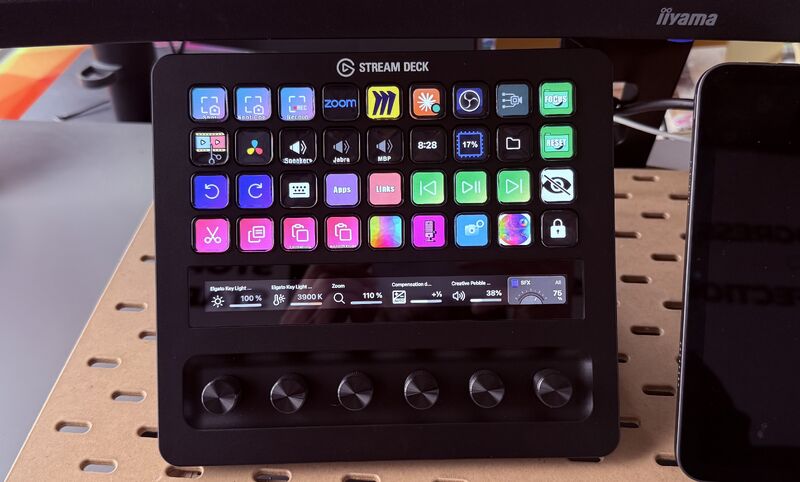
A lot of people are curious about how to use Elgato's Stream Deck on a daily basis so instead of listing the possibilities, here is how I partly use it - I say "partly" because this is only the home screen 😬
Left to Right, Top to bottom (I'll only mention what's worth mentioning):
→ 3 screenshot buttons. On a Mac, you do screenshots with keyboard shortcuts, and there are different ways : here I can screenshot to a folder, screenshot to my clipboard (to directly paste it) and screen record as a video
→ Miro folder : We're working with A LOT of different Miro boards. This is a folder containing links to all the Miro boards I need on a daily basis (or almost)
→ OBS app + virtual camera : As I like to turn off the webcam when not in use, I press these 2 keys before meetings
→ Sound output : 1-key switch between Mac speakers, external speakers and headset
→ CPU usage (useful when video editing)
→ Keyboard shortcuts : Useful when you need special characters like ↑↓←→ and don't want to google them every time
→ Apps & Links : Pretty self explanatory - way quicker (2 keys) than scrolling your shortcuts or apps
→ Hidden files : On Mac, you show your hidden files by pressing ⌘⇧. simultaneously. There's no way I'll remember that. And now I don't need to.
→ Copy-paste : Overkill if you know the shortcuts. But do you know how to paste without formatting? Shift + Cmd + Opt + V. Now it's just one button as well.
→ Color palette : When I want to do visuals for my company, I want to use only the colors from my color palette. I have there shortcuts with the HEX values of each color (and the image is a square of the right color, of course)
→ Sound effects : Just to play cricket sounds, airhorn sound, or rick-roll people in meetings
→ Camera : An OBS scene thing, I change from my normal camera to a zoom view to adding ELMO's to my camera, to a video of a colleague at his desk to mess with people's brains
→ Lock : Leave your laptop safe with just one press
Knobs :
→ Key Light brightness (also toggle on/off)
→ Key Light temperature
→ Camera zoom
→ Camera exposure
→ Sound volume
→ SFX volume
Hope it helps and gives some inspiration to people who are considering getting a Stream Deck, or those who recently got one but are not sure how to make good use of it 😊
Anything I should deepdive on?

39

5
View on